bunddev: Making bund.dev Analytically Usable in R

From the bund.dev idea to real API constraints and a three-layer R architecture.

R
OpenData
APIs
DataScience
Author

Michael Bücker

Published

February 15, 2026

bund.dev is a central infrastructure layer for discovering and documenting APIs from German federal institutions.1 bunddev translates that principle into an R-oriented analysis model: from API discovery to standardized requests and direct downstream use in reproducible data-science workflows.2

A Brief History of bund.dev

Publicly available sources show a clear trajectory:

  • In July 2021, the bundesAPI/sofortmassnahmen repository was created as a civil-society participation process around Germany’s “Second Open Data Act”.3
  • The documented 5-point plan defined a target state in which federal datasets and administrative procedures should be accessible via APIs by 2024.4
  • bund.dev positions itself as a development and documentation portal: discoverability, documentation, and reuse of APIs.5
  • The Python package bundesAPI/deutschland (since 2021) illustrates that the ecosystem moved early from documentation toward practical implementation.6
  • Crucially, this foundation was built by volunteers, although API documentation at this scale would normally require institutional support. The resulting professional quality even led to occasional perception as an official government service.78
  • This also exposed a structural weakness: civil society effectively compensated for a gap in public digital infrastructure.
  • In parallel, public backlash emerged. It was reported that some agencies started hardening interfaces that had become more visible through documentation, which is still visible today, including in parts of the Federal Employment Agency context.9

The core point remains: open data only becomes meaningful when it is actually usable under real technical conditions, for civil society, research, and product development.

Why an R Package?

In R-based data-science projects, value is created when public data can move into a consistent pipeline without friction:

  • retrieve
  • clean
  • join
  • visualize
  • model

That was the gap: APIs on bund.dev are highly valuable, but heterogeneous in structure, authentication, and response design. R workflows lacked a unified access layer.

bunddev Architecture: Three Layers

This leads to a three-layer architecture:10

  1. Registry layer: discover, filter, and inspect APIs (bunddev_list(), bunddev_info()).
  2. OpenAPI core: inspect specs and call arbitrary endpoints generically (bunddev_spec(), bunddev_call()).
  3. Adapter layer: ready-to-analyze tidy tibbles (smard_timeseries(), dwd_station_overview(), autobahn_roadworks(), …).

The key design criterion is not just connectivity, but analytical usability as a first-order requirement.

Main Implementation Challenges in bunddev

The major challenges were less about R itself and more about operational heterogeneity in API ecosystems:

  • Non-uniform response formats: deeply nested and inconsistent JSON structures.
  • Endpoint volatility: changing paths, schemas, or endpoint retirement.
  • Authentication heterogeneity: API keys, OAuth2, and custom/session flows.
  • Bot and edge protection: non-browser clients being blocked.
  • Runtime fragility: e.g., cache-key collisions or parser breaks after upstream HTML changes.

Practically, this means that some interfaces are currently paused until stable accessibility and consistent responses are restored.11

  • interpol: Akamai JavaScript bot detection blocks non-browser clients.
  • zoll: endpoints removed (redesign) plus Radware bot protection.
  • berufssprachkurssuche: public OAuth2 credentials revoked by BA.
  • coachingangebote: public OAuth2 credentials revoked by BA.
  • entgeltatlas: no official public API according to BA; credentials revoked.
  • weiterbildungssuche: undocumented internal BA endpoint; credentials revoked.

There are also known constraints in active adapters. For example, hochwasserzentralen can return empty lagepegel responses intermittently. diga requires a valid bearer token, which limits immediate public reproducibility.

Practical Usage

The following examples explicitly mirror the bunddev architecture: Registry → OpenAPI Core → Adapters.

1) Registry Layer: Discover and Classify APIs

The first step is intentionally methodological: do not call endpoints blindly. Instead, identify relevant APIs and inspect metadata first.
bunddev_list(tag = "energy") provides a compact overview. bunddev_info("smard") then adds key API metadata such as base URL, tags, and documentation link.

library(bunddev)

# Which APIs are tagged as energy-related?
bunddev_list(tag = "energy")
# A tibble: 3 × 8
  id              title        provider spec_url docs_url auth  rate_limit tags 
  <chr>           <chr>        <chr>    <chr>    <chr>    <chr> <chr>      <lis>
1 ladestationen   Ladesaeulen… Bundesn… https:/… https:/… none  <NA>       <chr>
2 marktstammdaten Marktdatens… Bundesn… https:/… https:/… none  <NA>       <chr>
3 smard           SMARD API    Bundesn… https:/… https:/… none  Mehr als … <chr>
# Metadata for a specific API
bunddev_info("smard")
# A tibble: 1 × 8
  id    title     provider          spec_url     docs_url auth  rate_limit tags 
  <chr> <chr>     <chr>             <chr>        <chr>    <chr> <chr>      <lis>
1 smard SMARD API Bundesnetzagentur https://raw… https:/… none  Mehr als … <chr>

2) OpenAPI Core Layer: Turn Specs into Robust Calls

The second step targets robustness: many failures come from wrong assumptions about IDs, parameter domains, or path variables.
bunddev_parameters("smard") exposes spec-defined parameters. bunddev_parameter_values(smard_timeseries, "filter") then provides valid filter values for the exact function used later.

# Spec-defined parameters for SMARD
bunddev_parameters("smard")
# A tibble: 14 × 8
   method path             name  location required description schema_type enum 
   <chr>  <chr>            <chr> <chr>    <lgl>    <chr>       <chr>       <lis>
 1 get    /chart_data/{fi… filt… path     TRUE     "Mögliche … integer     <int>
 2 get    /chart_data/{fi… regi… path     TRUE     "Land / Re… string      <chr>
 3 get    /chart_data/{fi… reso… path     TRUE     "Auflösung… string      <chr>
 4 get    /chart_data/{fi… filt… path     TRUE     "Mögliche … integer     <int>
 5 get    /chart_data/{fi… filt… path     TRUE     "Muss dem … integer     <int>
 6 get    /chart_data/{fi… regi… path     TRUE     "Land / Re… string      <chr>
 7 get    /chart_data/{fi… regi… path     TRUE     "Muss dem … string      <chr>
 8 get    /chart_data/{fi… reso… path     TRUE     "Auflösung… string      <chr>
 9 get    /chart_data/{fi… time… path     TRUE      <NA>       integer     <chr>
10 get    /table_data/{fi… filt… path     TRUE     "Mögliche … integer     <int>
11 get    /table_data/{fi… filt… path     TRUE     "Muss dem … integer     <int>
12 get    /table_data/{fi… regi… path     TRUE     "Land / Re… string      <chr>
13 get    /table_data/{fi… regi… path     TRUE     "Muss dem … string      <chr>
14 get    /table_data/{fi… time… path     TRUE      <NA>       integer     <chr>
# Valid values for a specific parameter
bunddev_parameter_values(smard_timeseries, "filter")
 [1] "1223"        "1224"        "1225"        "1226"        "1227"       
 [6] "1228"        "4066"        "4067"        "4068"        "4069"       
[11] "4070"        "4071"        "410"         "4359"        "4387"       
[16] "4169"        "5078"        "4996"        "4997"        "4170"       
[21] "252"         "253"         "254"         "255"         "256"        
[26] "257"         "258"         "259"         "260"         "261"        
[31] "262"         "3791"        "123"         "126"         "715"        
[36] "5097"        "122"         "DE"          "AT"          "LU"         
[41] "DE-LU"       "DE-AT-LU"    "50Hertz"     "Amprion"     "TenneT"     
[46] "TransnetBW"  "APG"         "Creos"       "hour"        "quarterhour"
[51] "day"         "week"        "month"       "year"       

3) Adapter Layer: Tidy Data for Analysis and Visualization

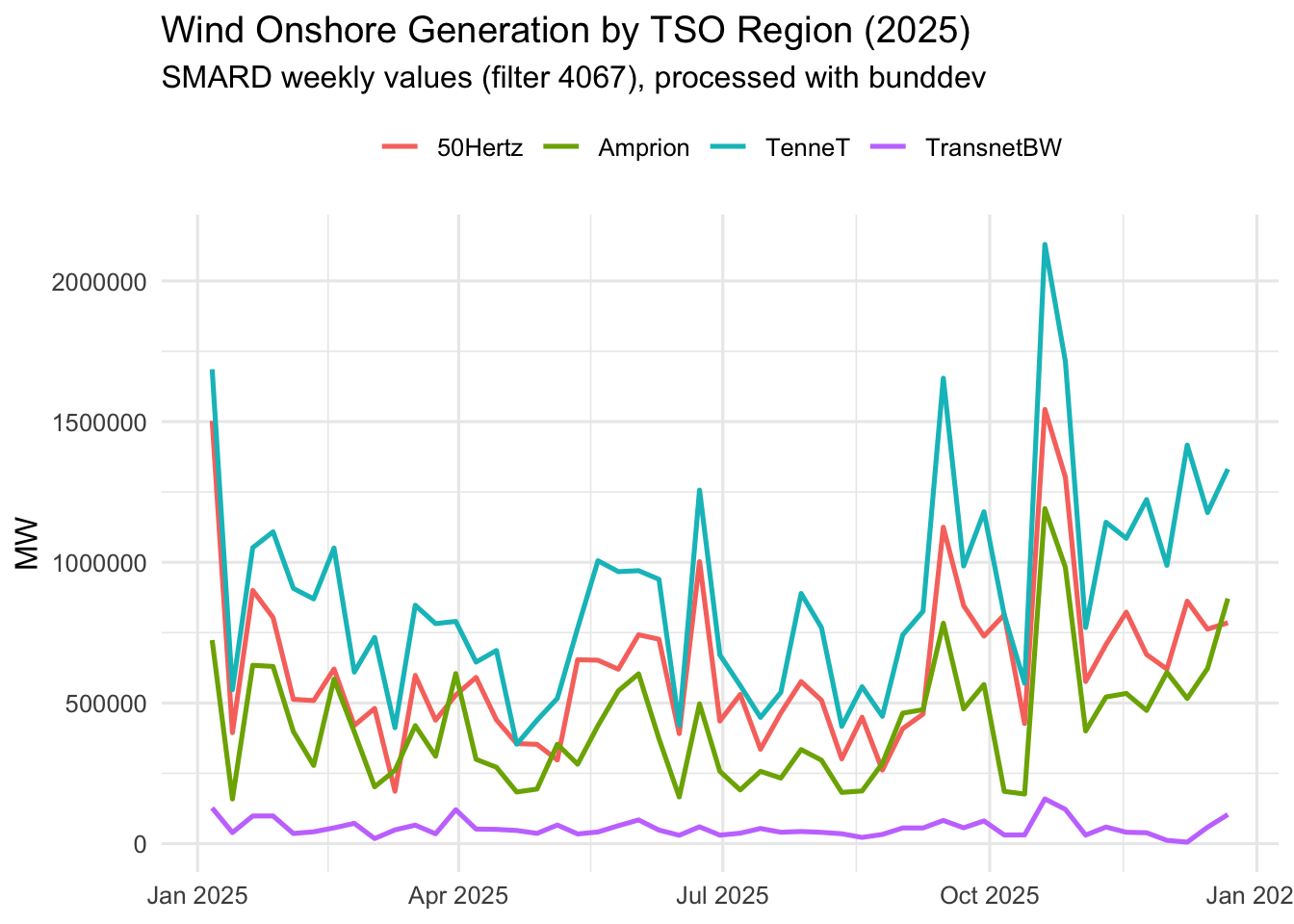
The third example stays fully inside bunddev and uses wind onshore generation (filter = 4067) across the four German TSO regions:

  • 50Hertz
  • Amprion
  • TenneT
  • TransnetBW

This yields two complementary perspectives:

  1. A full-year time series (weekly values by region).
  2. An interactive polygon map with regional mean values (TSO zones GeoJSON).
Code
library(bunddev)
library(dplyr)
library(ggplot2)
library(leaflet)

# Target year: last complete calendar year
analysis_year <- as.integer(format(Sys.Date(), "%Y")) - 1
anchor_year <- analysis_year - 1

regions <- c("50Hertz", "Amprion", "TenneT", "TransnetBW")

wind_year <- lapply(regions, function(region_id) {
  idx <- smard_indices(4067, region = region_id, resolution = "week") |>
    mutate(anchor_time = bunddev_ms_to_posix(timestamp))

  anchor_ts <- idx |>
    filter(format(anchor_time, "%Y") == as.character(anchor_year)) |>
    summarise(ts = max(timestamp, na.rm = TRUE)) |>
    pull(ts)

  smard_timeseries(
    4067,
    region = region_id,
    resolution = "week",
    timestamp = anchor_ts
  ) |>
    filter(format(time, "%Y") == as.character(analysis_year)) |>
    transmute(region = region_id, week = time, wind_mw = value)
}) |>
  bind_rows()

# Preview
wind_year |>
  group_by(region) |>
  summarise(
    weeks = n(),
    from = min(week),
    to = max(week),
    mean_mw = round(mean(wind_mw, na.rm = TRUE), 0),
    .groups = "drop"
  )
# A tibble: 4 × 5
  region     weeks from                to                  mean_mw
  <chr>      <int> <dttm>              <dttm>                <dbl>
1 50Hertz       51 2025-01-06 00:00:00 2025-12-22 00:00:00  628616
2 Amprion       51 2025-01-06 00:00:00 2025-12-22 00:00:00  428725
3 TenneT        51 2025-01-06 00:00:00 2025-12-22 00:00:00  890504
4 TransnetBW    51 2025-01-06 00:00:00 2025-12-22 00:00:00   55504
Code
# 1) Time series by TSO region
ggplot(wind_year, aes(week, wind_mw, color = region)) +
  geom_line(linewidth = 0.9) +
  labs(
    title = paste0("Wind Onshore Generation by TSO Region (", analysis_year, ")"),
    subtitle = "SMARD weekly values (filter 4067), processed with bunddev",
    y = "MW",
    x = NULL,
    color = NULL
  ) +
  theme_minimal(base_size = 12) +
  theme(legend.position = "top")

Code
# 2) Interactive polygon map of TSO zones
region_stats <- wind_year |>
  group_by(region) |>
  summarise(mean_mw = mean(wind_mw, na.rm = TRUE), .groups = "drop")

geo_path <- "../../../regelzonen_4ueNB.geojson"
if (!file.exists(geo_path)) {
  stop("GeoJSON not found: ", geo_path)
}
if (!requireNamespace("sf", quietly = TRUE)) {
  stop("Package 'sf' is required for the map.")
}

normalize_tso <- function(x) {
  x_low <- tolower(x)
  dplyr::case_when(
    grepl("50hertz", x_low) ~ "50Hertz",
    grepl("amprion", x_low) ~ "Amprion",
    grepl("tennet", x_low) ~ "TenneT",
    grepl("transnet", x_low) ~ "TransnetBW",
    TRUE ~ NA_character_
  )
}

zones <- sf::st_read(geo_path, quiet = TRUE)
possible_cols <- c("TSO", "tso", "region", "REGION", "name", "NAME")
tso_col <- intersect(possible_cols, names(zones))[1]
if (is.na(tso_col)) {
  stop("No suitable TSO column found in GeoJSON.")
}

zones <- zones |>
  mutate(region = normalize_tso(as.character(.data[[tso_col]]))) |>
  filter(!is.na(region)) |>
  left_join(region_stats, by = "region")

pal <- colorNumeric("viridis", domain = zones$mean_mw, na.color = "#cccccc")

leaflet(zones) |>
  addProviderTiles(providers$CartoDB.Positron) |>
  addPolygons(
    fillColor = ~pal(mean_mw),
    color = "white",
    weight = 1,
    fillOpacity = 0.85,
    label = ~paste0(region, ": ", format(round(mean_mw, 0), big.mark = "."), " MW"),
    popup = ~paste0(
      "<b>", region, "</b><br/>",
      "Mean wind generation ", analysis_year, ": ",
      format(round(mean_mw, 0), big.mark = "."), " MW"
    ),
    highlightOptions = highlightOptions(weight = 2, color = "#333333", bringToFront = TRUE)
  ) |>
  addLegend(
    "bottomright",
    pal = pal,
    values = ~mean_mw,
    title = "Mean Wind Generation (MW)",
    opacity = 0.9
  )

Conclusion

bunddev primarily serves as a productivity layer for open-data analytics in R: lower API friction, stronger focus on the analytical question itself. The combination of registry, generic OpenAPI core, and tidy adapters makes federal data sources not only reachable, but quickly analyzable in practice.

If an adapter is missing or an endpoint breaks, issues and PRs are always welcome.
Sources